Blog5/18/2026
Best Ergonomic Workspace Upgrades for Remote Workers
5 mins Read
The Briefing
Quick takeaways for the curious
A 'Biomechanical Harmony' framework guides upgrades to align with the body's natural architecture, prioritizing comfort and long-term well-being over fleeting aesthetics.
Dynamic seating with adjustable lumbar depth, 4D armrests, and a synchro-tilt keeps you moving and distributes weight to prevent lumbar strain.
Standing desks or converters introduce active work, but success comes from programmable presets and frequent position changes every 45–60 minutes, not all-day standing.
Peripheral design matters: ergonomically shaped keyboards and mice that minimize pronation and ulnar deviation reduce carpal tunnel risk.
A thoughtfully organized, tactile workspace reduces cognitive load and sustains focus by combining comfortable seating, adjustable height, and intentional movement.
For many of us, the home office has evolved from a temporary workaround into the primary stage where our professional lives unfold. When you invest in an ergonomic workspace upgrade, you aren't just buying furniture or gadgets; you are curating a sanctuary of productivity that protects your physical well-being and sustains your creative energy over the long haul.
The Philosophy of "Biomechanical Harmony"
When shopping for workspace upgrades, it is all too easy to fall into the "Aesthetic Over Function Trap"—the tendency to buy sleek, minimalist chairs that look stunning on Instagram but offer zero lumbar support, trendy standing desks that wobble under the slightest pressure, or "ergonomic" keyboards that prioritize futuristic shapes over actual comfort. We see this cycle every year: an influx of well-intentioned but poorly engineered products that lead to chronic back pain, eye strain, and the inevitable "afternoon slump" caused by physical fatigue.
At HootFinds, we reject the cycle of "performative productivity." Instead, we embrace the philosophy of "Biomechanical Harmony." This is the deliberate selection of workspace tools that align with the natural architecture of the human body. It is the recognition that the best ergonomic upgrades aren't just about looking professional; they are about reducing the cognitive load caused by physical discomfort. By prioritizing neutral spine alignment, intentional movement, and tactile comfort, we transform the desk from a site of daily endurance into a foundation for sustained focus.
The Foundation: Dynamic Seating and Active Support
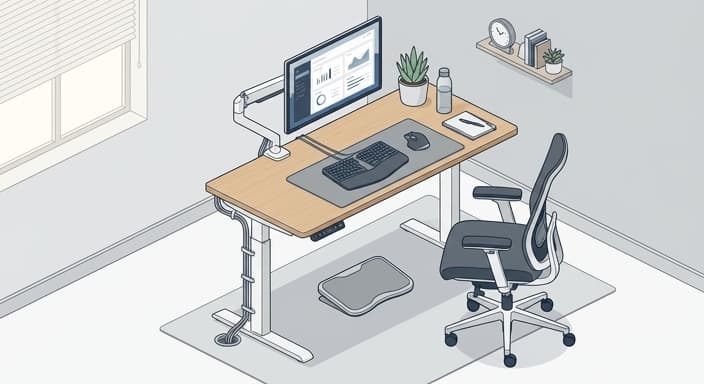
The chair is the anchor of your workspace, yet it is often the most misunderstood piece of equipment in the home office. Many remote workers settle for "task chairs" that are essentially glorified dining chairs—rigid, unresponsive, and unkind to the lower back. A true ergonomic upgrade requires "dynamic seating," which refers to chairs that move with your body rather than forcing you to stay locked in a single, static position for eight hours.
Look for features like adjustable lumbar depth, 4D armrests that can be tucked away to allow for closer desk access, and a synchro-tilt mechanism that keeps your feet planted even when you recline. The goal is to distribute your body weight evenly and prevent the pelvic tilt that leads to sciatica and lumbar strain. Remember, your chair should be a tool that encourages frequent micro-movements, which are essential for maintaining circulation and alertness throughout the workday.
Elevating the Workflow: The Case for Verticality
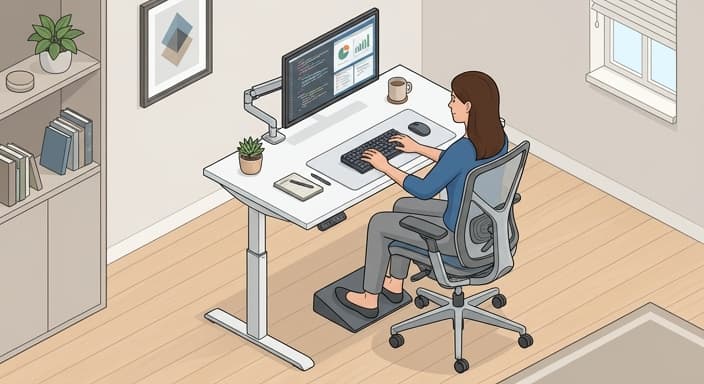
If you are still working from a static, fixed-height desk, you are effectively tethering your health to a single posture. The "Sitting Disease" is a real phenomenon, characterized by metabolic slowdown and muscular atrophy caused by prolonged periods of stillness. Transitioning to a high-quality standing desk—or even a motorized converter—is the single most effective way to introduce "active work" into your routine.
When selecting a standing desk, prioritize stability and motor quietness. A desk that shakes while you type is a major distraction and can actually lead to increased finger and wrist tension as your body compensates for the instability. Look for desks with programmable height presets, which remove the friction of manual adjustment. The key to success here isn't standing for the entire day; it’s the ability to alternate positions every 45 to 60 minutes. By integrating vertical movement into your workflow, you stimulate blood flow, boost caloric burn, and keep your mind sharp during those taxing mid-afternoon meetings.
Peripheral Precision: Reducing Repetitive Strain
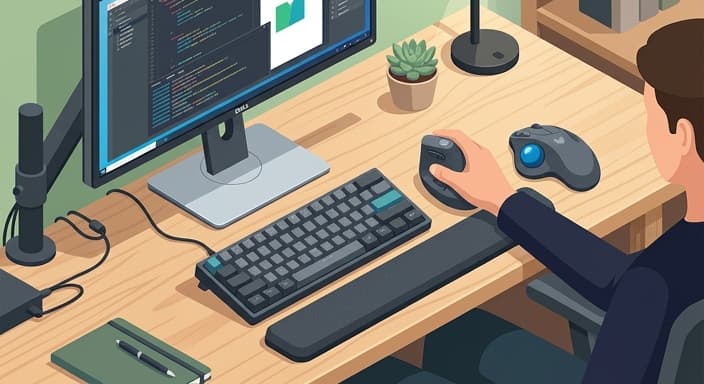
We often overlook the items we touch the most: our keyboards and mice. The standard peripherals included with most computers are designed for mass appeal, not for human physiology. They force the wrists into unnatural angles—pronation and ulnar deviation—that can lead to carpal tunnel syndrome or tendonitis over time.
An ergonomic keyboard, such as a split or "tenting" design, allows your hands to rest in a neutral, handshake-like position. This keeps the forearms aligned and reduces the tension that migrates from your wrists up into your shoulders and neck. Similarly, a vertical mouse or a trackball can be a game-changer. By shifting the grip, you eliminate the constant twisting of the forearm bones, allowing you to navigate your digital landscape with significantly less effort. When you pair these upgrades with a high-density memory foam wrist rest, you create a tactile experience that feels fluid and effortless rather than taxing and repetitive.
The Visual Horizon: Eye Health and Lighting Control
Digital eye strain is the hidden tax of remote work. Staring at a screen for hours without proper positioning or ambient support leads to headaches, blurred vision, and a general sense of mental exhaustion. The most overlooked ergonomic upgrade is actually your monitor configuration. Your screen should be positioned so that the top third of the display is at or slightly below eye level. If you are constantly looking down at a laptop screen, you are subjecting your cervical spine to "tech neck," a condition where the weight of your head puts massive strain on your upper back muscles.
In addition to monitor arms, consider the role of bias lighting. By placing an LED light strip behind your monitor, you reduce the contrast between your bright screen and the dark surroundings. This simple addition softens the visual impact of the display, making it easier for your eyes to focus and reducing the fatigue associated with high-contrast viewing. Pair this with a task lamp that offers adjustable color temperature—cool, blue-toned light for focus in the morning, and warmer, softer light for winding down in the late afternoon—and you create a visual environment that supports your circadian rhythm rather than fighting it.
Cultivating Your Professional Sanctuary
Ultimately, your home office should be a reflection of your commitment to yourself. Ergonomics is not just about avoiding pain; it is about creating the conditions where your best work can happen. When your physical needs are met, you find that you have more "bandwidth" for the complex, creative, and strategic thinking that your job demands. By investing in a chair that supports your spine, a desk that encourages movement, and peripherals that respect your anatomy, you are moving away from the "survival mode" of working from home and toward a model of sustainable, joyful productivity. Take the time to audit your space, listen to what your body is telling you at the end of the day, and choose upgrades that serve your long-term well-being—because your greatest asset, after all, is you.
Common Questions
🤔
Frequently Asked Questions
What is biomechanical harmony, and why is it essential for remote workers?▼
Biomechanical harmony is a design philosophy that aligns tools with the body's natural movements and postures. It emphasizes neutral spine, comfortable support, and reduced cognitive load from discomfort. In remote work, this translates to chairs, desks, and accessories that accommodate frequent micro-movements and varied postures rather than forcing a single fixed position. By designing your workspace around the body's mechanics, you sustain energy, focus, and long-term health.
Which features define an ideal dynamic chair?▼
An ideal dynamic chair should offer adjustable lumbar depth to support the lower back, 4D armrests that can move to accommodate different tasks, and a synchro-tilt mechanism that allows comfortable reclining while keeping feet on the floor. It should provide a comfortable seat depth, breathable upholstery, and high-quality lumbar support that you can tailor over time. The goal is to encourage natural movement and prevent pelvic tilt, which can lead to sciatica and other strains.
How should I implement height-adjustable workstations effectively?▼
Start with a height-adjustable desk or converter that reliably holds position and operates quietly. Use programmable height presets to switch between sitting and standing without manual fiddling. Aim to transition every 45 to 60 minutes, and pair with anti-fatigue mats and bright cues to maintain posture and blood flow.
What peripherals best prevent repetitive strain in a home setup?▼
Choose an ergonomic keyboard with a neutral angle and low force keys, and a pointing device such as a vertical mouse or trackball that reduces wrist deviation. Ensure the peripherals are sized to fit your forearm's natural alignment and include wrist rests that support a relaxed position without creating pressure points. This setup lowers pronation and ulnar deviation, helping prevent carpal tunnel syndrome and related discomfort.