Blog5/14/2026
Best Tech Gifts for Remote Workers: Ergonomic & Efficient
6 mins Read
The Briefing
Quick takeaways for the curious
Frictionless Workflow focuses on choosing technology that removes obstacles rather than adding clutter, prioritizing seamless integration with existing devices and real, tangible gains in daily output.
It is essential to protect time and mental clarity through gear that reduces digital fatigue and physical strain, not gimmick gadgets that promise productivity but underperform.
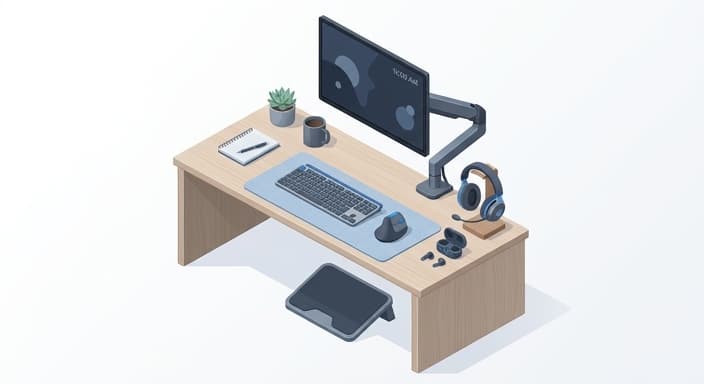
Ergonomics and physical longevity ground great remote worker gifts: adjustable monitor arms, footrests, and vertical mice that promote healthier postures over long workdays.
Audio clarity is a prerequisite for professional presence: noise-canceling headsets with boom mics and multipoint earbuds help maintain clear communication amid home-life distractions.
Ultimately, the most valuable gifts are practical, long-term improvements that might not look flashy but become foundational elements of a remote worker’s daily workflow.
The lines between the office and the living room have permanently blurred, turning our homes into command centers that demand both high-octane focus and sustainable comfort. Finding the right gift for a remote worker isn't just about buying a new gadget; it’s about curating an ecosystem that protects their time, preserves their posture, and elevates their daily output.
The Philosophy of "Frictionless Workflow"
When shopping for the remote worker in your life, it is all too easy to fall into the "productivity trap"—the tendency to buy clutter-heavy desk accessories that promise focus but only provide distraction, over-complicated smart home hubs that require a degree in engineering to set up, or "ergonomic" gadgets that look impressive in catalogs but fail to provide actual physical support. We see this cycle every year: an influx of gimmicky USB-powered desk toys that serve no real purpose, high-maintenance hardware that demands constant troubleshooting, and aesthetic-focused setups that prioritize Instagram-ready photos over the reality of an eight-hour workday. At HootFinds, we reject the cycle of "performative productivity." Instead, we embrace the philosophy of "Frictionless Workflow."
Frictionless Workflow is the deliberate act of selecting technology that removes the obstacles between the worker and their best work. It is the recognition that the best tech gifts are those that operate invisibly in the background, minimizing physical strain and digital fatigue. It is about choosing equipment that respects their personal space, integrates seamlessly with their existing devices, and provides a tangible, immediate upgrade to their daily routine. When we focus on frictionless tools, we aren't just giving a gadget; we are giving them the gift of reclaimed time and mental clarity.
The Foundation: Ergonomics and Physical Longevity
Before we talk about software or high-end monitors, we must address the physical reality of the remote grind. Long hours at a desk are taxing on the body, and the most thoughtful gift you can provide is one that actively fights the "tech-neck" and lower back strain associated with sedentary work. The gold standard here is an adjustable monitor arm or an under-desk footrest that encourages dynamic movement.
Look for gas-spring monitor arms that allow the user to shift their screen height throughout the day. This simple change allows them to transition from a seated position to a more upright posture, reducing the slump that inevitably sets in by mid-afternoon. If they are already set on desk space, consider a high-quality vertical mouse. Unlike traditional mice, which force the forearm into an unnatural twisted position, vertical mice keep the hand in a "handshake" grip, significantly reducing strain on the wrist and carpal tunnel area. These are the kinds of gifts that don't look flashy in a box, but six months later, they will be the most thanked items in the user’s home office.
Audio Clarity and the "Deep Work" Sanctuary
In a home environment, control over your auditory landscape is the ultimate luxury. Remote work often means balancing professional calls with the unavoidable background noise of home life—a neighbor’s lawnmower, a delivery driver, or the hum of a laundry machine. The right audio gear is the bridge between a chaotic home and a professional-grade office.
For the person who spends hours on video calls, prioritize a noise-canceling headset with a dedicated, high-fidelity boom microphone. The key here is "active noise cancellation" (ANC) that filters out ambient sound from the microphone side, not just the ear side. This allows the user to speak clearly without worrying about background distractions. If they prefer a more minimal look, look for high-end earbuds that feature multipoint Bluetooth connectivity. This allows them to switch instantly between their laptop for a Zoom call and their phone for a private conversation without fumbling through settings. A quiet workspace is the greatest catalyst for deep work, and high-quality audio is the tool that makes that silence possible.
Lighting and the Digital Presence
We have entered the era of the "video-first" workplace. Whether they are presenting to a board of directors or collaborating with a remote team across time zones, how they appear on screen matters. Poor lighting leads to grainy video and a tired, washed-out appearance, which can subconsciously signal low energy to colleagues. The solution isn't a complex studio lighting rig; it is a compact, high-CRI (Color Rendering Index) LED panel that clips directly onto their monitor or mounts behind it.
The best lights for remote workers are those that offer adjustable color temperatures. Being able to shift from a cool, daylight-toned light—perfect for morning productivity—to a warmer, softer light for afternoon meetings can change the entire mood of a workspace. Look for options that diffuse the light through a soft lens to avoid harsh glares or reflections on glasses. When a remote worker feels like they look professional and prepared, their confidence increases, and the quality of their communication improves. It is a subtle upgrade, but one that pays dividends in every meeting they attend.

Power Management and Cable Hygiene
Nothing kills a workflow faster than a dead battery or a chaotic nest of tangled cables. The "clutter-stress" caused by messy desks is a real psychological drain, and the best way to combat it is through centralized, high-speed power management. A powerful GaN (Gallium Nitride) wall charger is a game-changer for the remote worker. These chargers are significantly smaller than traditional power bricks but can deliver enough wattage to charge a laptop, a tablet, and a smartphone simultaneously.
Pair this with a high-quality, braided cable management kit. When you strip away the visual noise of excess wires, the brain feels lighter. Encourage the use of a magnetic cable organizer or a simple under-desk tray to keep the floor clear. By gifting them the ability to power all their devices from a single, organized hub, you are helping them reclaim their desk surface. A clear desk leads to a clear mind, and in a home office, that is the most valuable asset they have.
The Integration of Human-Centric Tech
The final piece of the puzzle is ensuring that the technology we introduce doesn't alienate the user from their own humanity. We should avoid "smart" devices that demand attention—apps that ping for no reason, or trackers that turn work into a competitive sport. Instead, we should look for tech that fades away. A mechanical keyboard with a tactile, satisfying feel, for example, makes the act of typing a sensory pleasure rather than a chore. A high-resolution monitor with a "blue light filter" setting protects their eyes without needing an external app.
When you select a gift for a remote worker, ask yourself: Does this tool solve a problem, or does it add a new one? Does it make their day faster, or does it add a step to their routine? The best tech gifts for remote workers are those that become invisible, allowing the individual to focus entirely on their mission. By choosing tools that prioritize physical health, audio-visual professionalism, and a clutter-free environment, you are giving them the ultimate gift: the ability to command their space, master their time, and thrive in the modern era of work. Remember, the goal is to make their home office a place they genuinely want to inhabit, a sanctuary of productivity that supports their career and protects their well-being.
Common Questions
🤔
Frequently Asked Questions
What categories of gifts tend to have the biggest impact for remote workers?▼
Remote workers benefit most from items that address posture, focus, and seamless setup. Think ergonomic basics like adjustable monitor arms, sit-stand solutions, footrests, and a comfortable pointing device that reduces strain. Also consider products that fit cleanly into existing workflows without adding setup headaches or compatibility issues. The key is to avoid clutter and choose tools that deliver lasting comfort and efficiency.
How can I ensure ergonomic gifts actually help instead of gathering dust?▼
To ensure ergonomic gifts are actually used, prioritize usefulness and ease of integration over novelty. Look for adjustable, tool-free installation and compatibility with common desks and devices. Choose items with clear benefits for posture and comfort, and avoid gadgets that require constant maintenance or software troubleshooting. If possible, confirm the recipient's space and preferences to tailor the gift accordingly.
What are examples of 'frictionless' tech gifts and why do they matter?▼
Examples of frictionless tech include gas-spring monitor arms for easy height adjustment, vertical mice that reduce wrist strain, noise-canceling headsets with boom mics for on-call clarity, and multipoint earbuds for seamless device switching. These items integrate with existing setups, require minimal setup time, and deliver immediate improvements in focus and comfort. They avoid gimmicks and deliver measurable benefits over time.
Why is audio gear important for remote work, and what features should I look for?▼
Audio gear is central to professional presence when working remotely because background noise and call quality directly affect communication. Look for features like active noise cancellation (ANC) on the microphone side, a high-fidelity boom mic, and reliable wireless connectivity such as multipoint Bluetooth. A headset or premium earbuds that keep calls clear across environments helps maintain credibility and reduces fatigue from repeated clarifications. The right setup minimizes distractions for both the user and their teammates.