Blog3/2/2026
Smart Desk Organization Tips: Boost Focus and Productivity
10 mins Read

The Briefing
Quick takeaways for the curious
Research from neuroscience shows that a cluttered desk competes for neural resources, reduces information processing, and raises cortisol, making it harder to focus; creating an orderly environment supports executive function and enables deeper work.
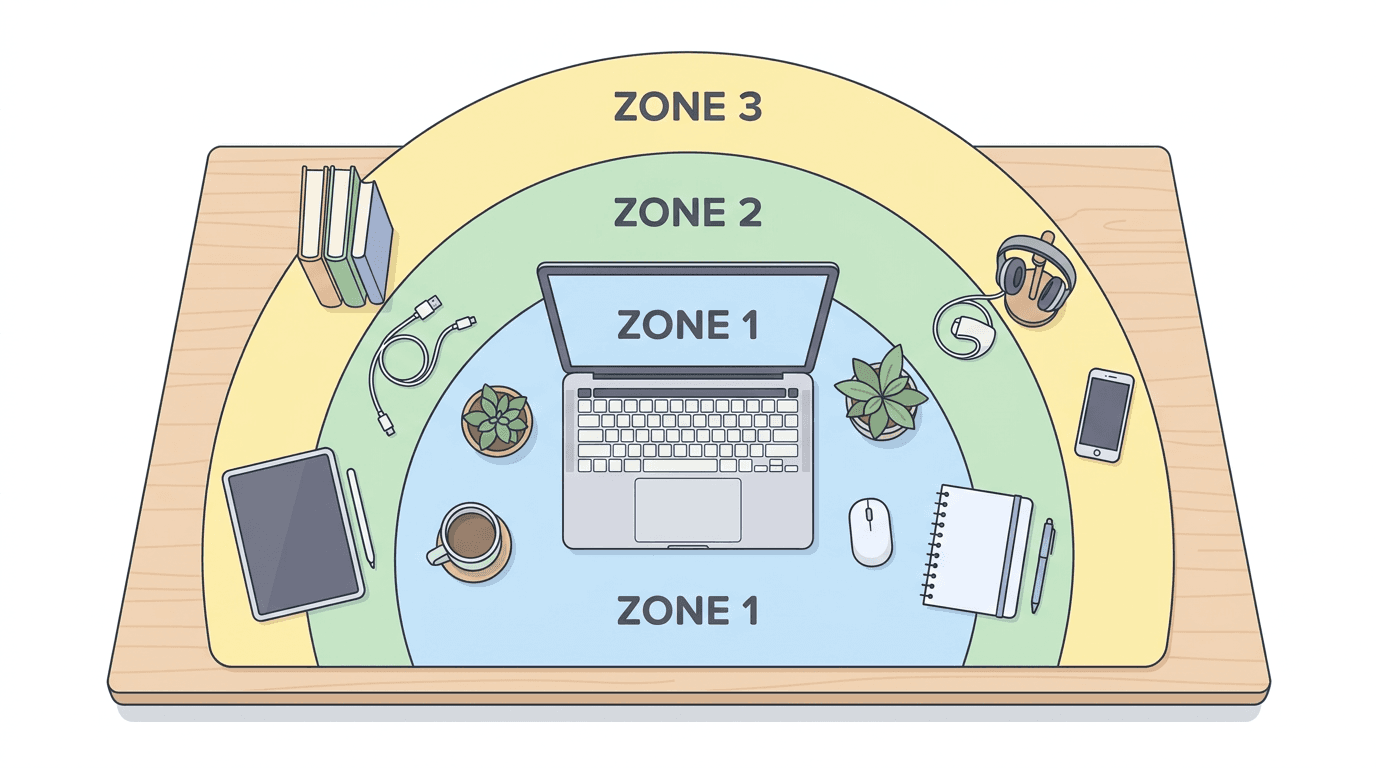
Apply the Zone System by dividing your desk into Zone 1 (Primary Work Area), Zone 2 (Reach Zone), and Zone 3 (Reference Zone) to establish a predictable quiet zone that signals the brain it's time to engage in high-level processing.
Shifting from a reactive to a proactive workstation removes friction, clears a path for deep work, and improves the quality and longevity of your professional output.
Adopt mise en place principles—predefining homes for tools and evenly distributing items by frequency—to minimize micro-distractions and keep the visual field orderly.
Use psychology-informed rituals and happiness cues, such as mindful cleaning and design choices, to reinforce a sense of control and comfort in your workspace, echoing the idea that cleaning can foster happiness within the environment.
Architecting the Command Center: The Neuroscience and Nuance of Smart Desk Organization
We are currently living in the era of the "Cognitive Cockpit." For the modern professional, the desk is no longer just a flat surface where paperwork accumulates; it is the high-stakes intersection of digital output, physical comfort, and psychological clarity. Yet, for many of us, this command center has become a site of friction rather than flow. We battle a rising tide of tangled USB-C cables, coffee-ringed notebooks, and the subtle, persistent hum of visual noise that drains our focus before the first meeting of the day even begins. This isn't merely an aesthetic grievance. Research from the Princeton University Neuroscience Institute suggests that our brains are hardwired for order; when our environment is cluttered, the visual chaos competes for our neural resources, limiting our ability to process information and increasing cortisol levels. To organize a desk is not just to "tidy up"—it is to perform a radical act of cognitive optimization. It is the realization that the quality of your work is inextricably linked to the quality of the space in which it is birthed. By transitioning from a "reactive" desk to a "proactive" workstation, we aren't just clearing off a surface; we are clearing a path for the deep work that defines our legacy.
The Psychology of Visual Noise: Why Your Brain Craves Order
The relationship between our physical environment and our internal state is recursive. When your desk is a graveyard of half-finished projects and redundant tech, your brain treats every object as a "to-do" item, even if subconsciously. This phenomenon, often called "attentional blink," occurs when the brain is so overwhelmed by stimuli that it fails to register important information. A study published in the Journal of Neuroscience confirms that the presence of multiple visual stimuli in the field of view results in a competition for neural representation. In simpler terms: every stray pen and tangled wire is a micro-distraction that saps your "Executive Function"—the mental energy required for planning, focusing, and making decisions.
To combat this, we must adopt the "Zone System" of desk organization. This approach borrows from the mise en place philosophy of professional chefs, where every tool has a predetermined, logical home based on its frequency of use. Zone 1 (The Primary Work Area) should be reserved exclusively for your computer and immediate input devices. Zone 2 (The Reach Zone) contains items used several times a day, like a notepad or a glass of water. Zone 3 (The Reference Zone) is for items used occasionally, such as filing cabinets or reference books. By strictly enforcing these boundaries, you create a visual "quiet zone" that signals to your brain that it is time to engage in high-level processing.
"The objective of cleaning is not just to clean, but to feel happiness living within that environment." — Marie Kondo
The Vertical Frontier: Reclaiming Your Desktop Real Estate
The most common mistake in desk organization is treating the workspace as a two-dimensional plane. When we run out of horizontal space, we feel cramped, leading to the "clutter creep" that eventually swallows our keyboard. The solution lies in the vertical dimension. By elevating your equipment, you effectively double your usable square footage. Monitor arms are the "power move" of the modern office. Not only do they allow for perfect ergonomic alignment—preventing the "tech neck" that plagues the modern workforce—but they also "float" your screens, leaving the surface beneath them free for tactile tasks or minimalist decor.
Beyond monitor arms, the use of modular pegboards and wall-mounted shelving turns the wall in front of you into a functional dashboard. This is particularly effective for tech-heavy setups where peripheral devices like headphones, controllers, and tablets can be stored vertically. This "Floating Desk" aesthetic does more than just look sleek; it creates a sense of airy openness that reduces the feeling of being "boxed in" during long work hours. When your tools are visible but off the surface, they transition from "clutter" to "curated display."
Taming the Digital Umbilicals: Cable Management as Zen Practice
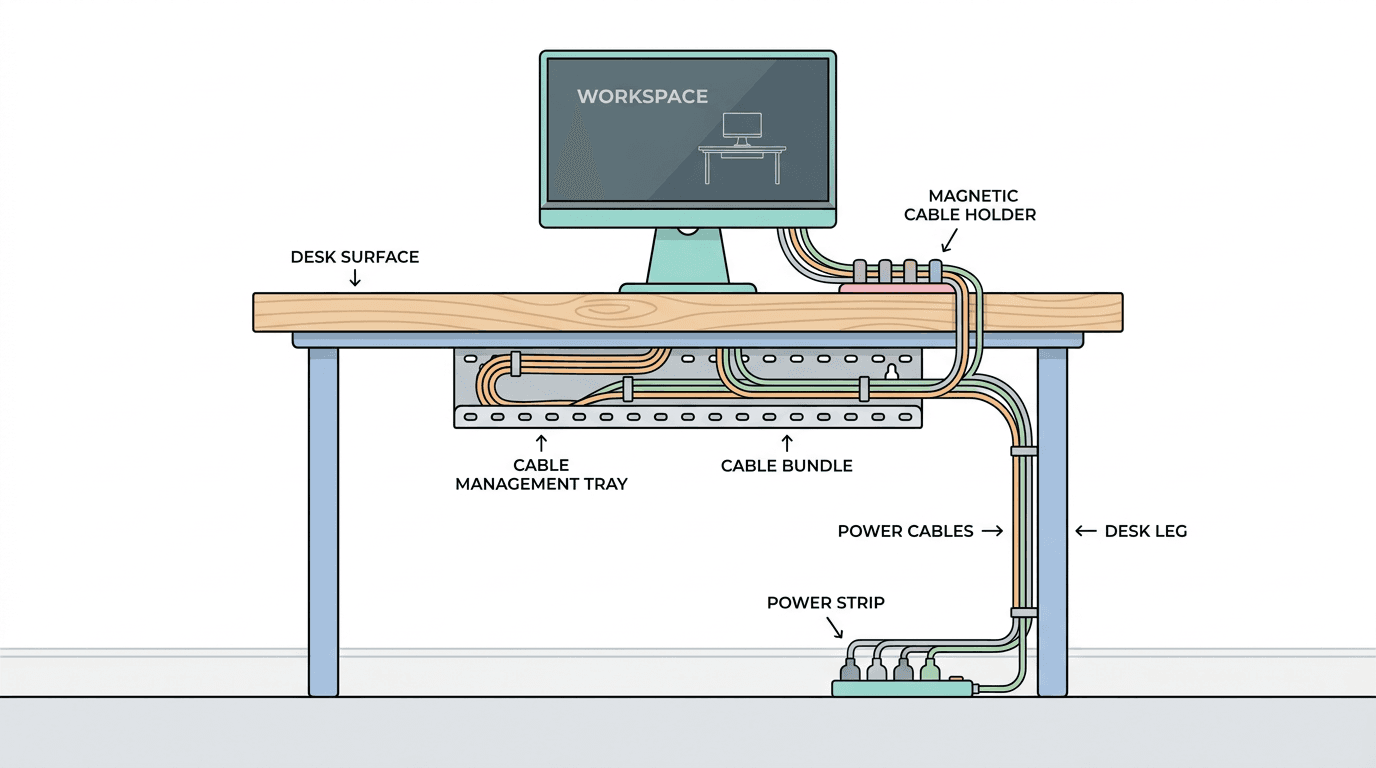
Nothing shatters the illusion of a premium workspace faster than a "spaghetti nest" of cables. Beyond the aesthetic disaster, tangled wires are a physical hazard and a source of significant mental friction. If you have to fight through a jungle of cords to plug in a hard drive, you are experiencing a "micro-aggression" of design. Smart desk organization treats cable management not as an afterthought, but as the foundation of the build.
The goal is "Total Cable Occlusion"—the art of making every wire invisible or, at the very least, intentional. This starts with a high-quality under-desk cable tray or a "privacy shield" that hides the power strip and excess slack. For the cables that must remain on the surface, magnetic cable blocks and weighted clips ensure that your charging tips stay exactly where you need them, rather than sliding behind the desk the moment you unplug your phone. A 2021 survey of remote workers found that individuals with organized cable setups reported 15% higher levels of daily "work satisfaction," likely due to the reduction in visual chaos and the ease of device transitions.
The HootFinds Buyer’s Guide: Essential Tools for the Optimized Desk
Achieving a high-performance desk requires more than just discipline; it requires the right infrastructure. We have curated a list of products that represent the pinnacle of form and function, designed to transform a chaotic surface into a streamlined sanctuary.
- The Foundation: — This isn't just a desk; it's an integrated ecosystem. With a built-in cable management channel and a fully magnetic surface, it allows you to snap organizers and cable anchors directly to the frame, eliminating the need for adhesive clutter.
- The Surface: — A desk mat is the "anchor" of your workstation. It defines the workspace, provides a tactile boundary for your keyboard and mouse, and adds a layer of acoustic dampening that makes the entire room feel more premium.
- The Lift: — For those looking to reclaim their vertical space, this arm offers unparalleled fluidity. It allows you to transition between deep work and collaborative viewing with a single touch, all while keeping your desk surface clear.
- The Hub: — Instead of having three different charging cables snaking across your desk, this handcrafted wooden dock centers your iPhone, Apple Watch, and AirPods in one elegant, sustainable station.
- The Organizer: — The gold standard for vertical storage. Its modular nature means you can customize your tool storage as your workflow evolves, keeping your most-used gadgets within arm's reach but off your desk.
- The Detail: — These small, understated silicone clips are the unsung heroes of organization. They keep your essential peripheral cables (like your webcam or microphone) perfectly routed along the edges of your furniture.
Systems Over Stuff: The Ritual of the Five-Minute Reset
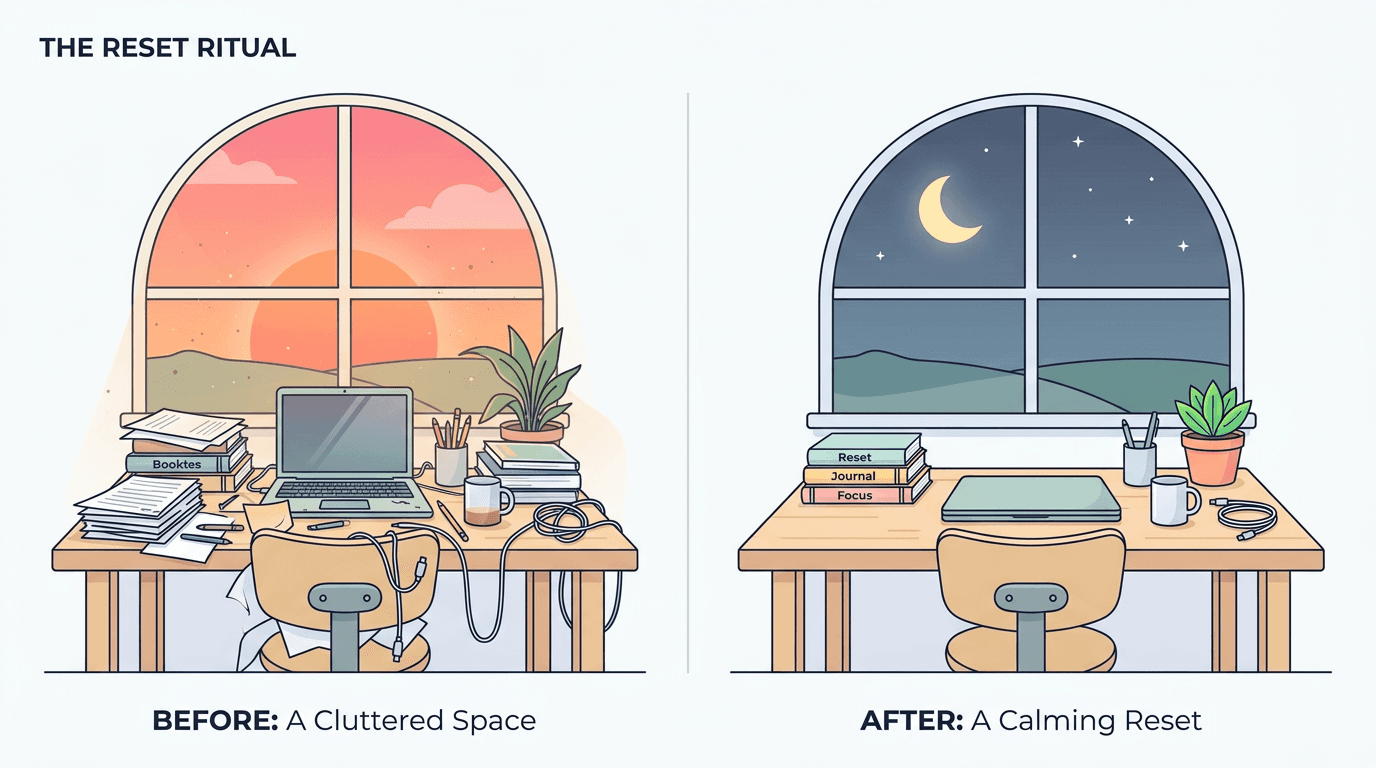
Even the most expensive organizational tools will fail if they aren't supported by a system of habits. The "Smart Desk" is a living organism that requires maintenance. One of the most effective habits you can adopt is the "Five-Minute Reset" at the end of every workday. This involves returning all items to their designated zones, wiping down the surfaces, and clearing the digital desktop of temporary files.
This ritual serves two purposes. First, it ensures that you aren't starting your next morning by "cleaning up yesterday's mess," which is a psychological drain on your initial burst of morning energy. Second, it acts as a "shutdown ritual," a concept popularized by productivity expert Cal Newport. By physically resetting your space, you signal to your brain that the workday is over, allowing for a cleaner transition into rest and recovery.
Furthermore, consider the "One-In, One-Out" rule for desk accessories. For every new gadget or decorative item you add to your desk, one must be removed or moved to long-term storage. This prevents the slow accumulation of "sentimental clutter"—the old coffee mugs, defunct charging bricks, and outdated planners that quietly consume your mental bandwidth.
The Sensory Desk: Integrating Lighting and Biophilia
Organization isn't just about where things sit; it’s about how the space feels. A truly "smart" desk considers the sensory experience of the user. Biophilic design—the practice of incorporating natural elements into the built environment—has been shown to reduce stress and increase creativity. A single, well-placed low-maintenance plant, such as a Snake Plant or a Pothos, can improve air quality and provide a visual "rest point" for the eyes during intense focus sessions.
Lighting is the final, often overlooked, component of desk organization. A cluttered desk under harsh overhead fluorescent lights feels chaotic; the same desk under a warm, directed task light feels like a sanctuary. BenQ and other manufacturers have pioneered the "ScreenBar"—a light that sits atop your monitor and illuminates your workspace without creating glare on the screen. This saves desk space that would otherwise be occupied by a traditional lamp and ensures that your Zone 1 is always perfectly lit, regardless of the time of day.
Key Concepts for a High-Performance Desk:
- Zero-Gravity Surface: Use monitor arms and wall mounts to keep the desk surface as empty as possible.
- Tactile Boundaries: Use a desk mat to define your "Focus Zone."
- Hidden Infrastructure: Route all cables through under-desk trays.
- Intentional Biophilia: Add one living element to ground the tech-heavy environment.
- The 5-Minute Reset: End every day by returning the desk to its "Ready State."
Conclusion: The Desk as a Mirror of the Mind
Ultimately, the quest for the perfect desk setup is not about achieving a Pinterest-worthy aesthetic. It is about building a support system for your highest self. Your desk is a physical manifestation of your mental state; when it is fragmented and chaotic, your thoughts often follow suit. Conversely, a workspace that is intentional, ergonomic, and free of unnecessary friction becomes a catalyst for the "Flow State"—that elusive psychological territory where time disappears and your best work happens.
As we continue to navigate the complexities of the digital age, our physical environments remain the primary anchor for our biology. We are physical beings operating in a digital landscape, and the desk is the bridge between those two worlds. By investing in smart organization, you aren't just buying a better monitor arm or a sleeker desk mat; you are investing in your own cognitive longevity. You are creating a sanctuary where distraction goes to die and where your most ambitious ideas have the space they need to breathe, grow, and eventually, take flight. Your desk is no longer just a piece of furniture—it is the launchpad for your next great breakthrough. How will you build yours?
Common Questions
🤔
Frequently Asked Questions
How can I organize my desk to boost productivity and focus?▼
Organize around a Zone System to reduce visual clutter: keep your primary work area clear for your computer, place frequently used items within easy reach in the Reach Zone, and store reference materials in a designated Reference Zone. This structure creates a visual quiet zone that supports sustained attention and faster decision making. Start by removing nonessential items, grouping cables, and setting predictable homes for tools, then maintain the setup with a daily 5-minute reset.
What is the Zone System for desk organization and how does it work?▼
The Zone System divides the desk into three zones: Zone 1 for the computer and immediate inputs, Zone 2 for items used several times a day, and Zone 3 for reference materials and seldom-used items. By configuring these zones, you create clear boundaries and reduce visual noise, which primes your brain for deep work. Enforce the zones consistently so items return to their predefined homes after use, preserving the quiet zone.
Why does desk clutter affect my brain and performance?▼
A cluttered desk introduces multiple visual stimuli that compete for neural representation, effectively taxing executive function and attention. This can lead to attentional blink, slower information processing, and higher stress levels, hindering planning and decision making. The research cited from neuroscience links orderly environments with better cognitive performance and calmer physiology.
How can I create a proactive workstation that supports deep work?▼
Design your workstation to minimize friction and anticipates your needs before you start: maintain a clear primary work area, keep essential tools within the Reach Zone, and store reference items out of sight until needed. Implement routines that regularly reset the desk to its Zone System configuration and create a predictable workflow that signals the brain to enter deep work mode. By proactively organizing, you reduce interruptions and preserve cognitive bandwidth for high-level tasks.